Durga Puja baby photoshoot ideas at home
Celebrate Durga Pujo with your little blessing. Explore seven festive baby photoshoot themes: five devotional scenes with Maa Durga-inspired artwork, lotus flowers, lion and tiger companions, Mata eyes and rangoli, plus two Dussehra scenes for Vijayadashami, the festival's final day. Add a favourite baby photo already on your phone, adjust it to the scene and save a festive portrait at home.
Your baby's face stays on your device.

How it works
1. Choose an existing baby photo
Use a clear full-body photo for Shakti Mata, Sherawali or Durga Mata, or an overhead photo for Rangoli, Happy Navratri, Happy Dussehra and Ravan Dahan.
2. Pick your devotional scene
Select one of the seven themes, then move and resize your baby's real photo to fit the composition.
3. Save your Durga Puja keepsake
Download the finished portrait to share a family greeting or remember your baby's first Durga Pujo.
Seven Durga Puja and Vijayadashami themes for your baby
Explore finished portraits, then choose a scene to make with your own baby photo.
Durga Puja baby boy photoshoot ideas
For a Durga Puja theme baby boy photoshoot, try Shakti Mata's temple arch and plush lion, Sherawali Mata's tiger or Durga Mata's fabric lion. A front-facing photo with the whole body visible makes it easier to place your baby in the devotional composition.
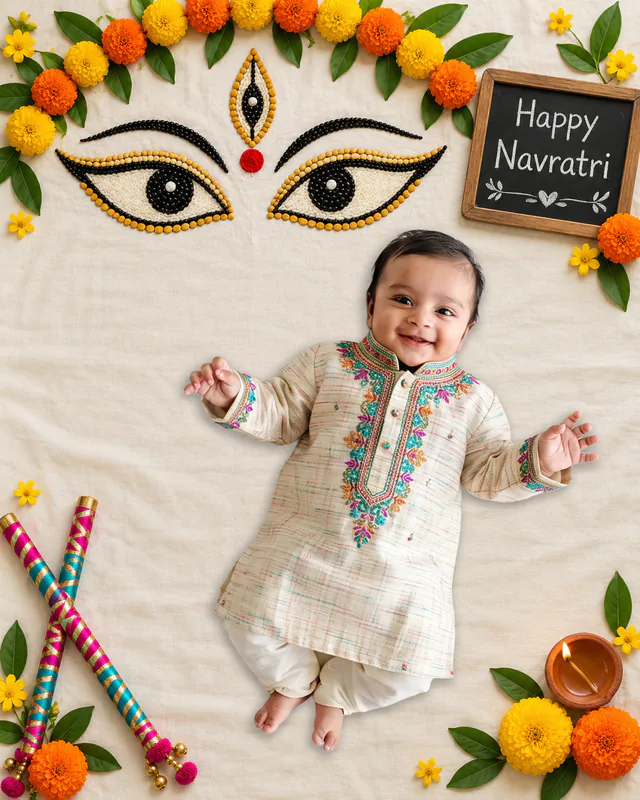
For a softer look, choose a relaxed overhead photo for Rangoli or Happy Navratri. These themes work for boys and girls alike. An existing kurta photo can add festive colour, but Natkhat keeps the original outfit and does not create a costume.
Durga Puja baby girl photoshoot ideas
Shakti Mata, Sherawali Mata and Durga Mata offer little Devi-inspired portraits with illustrated arms, lotus flowers and lion or tiger companions. Choose a front-facing full-body baby photo for these scenes. Rangoli frames an overhead photo beside a colourful Devi face, while Happy Navratri adds decorative Mata eyes and flowers.
Choose by the pose and mood you like, rather than gender. A festive dress or other favourite outfit already in the photo stays visible in the finished portrait; no special costume is required.
Your baby's first Durga Puja portrait
Make a first Durga Pujo keepsake from a favourite photo taken at home. Shakti Mata creates a devotional portrait beneath a temple arch; Rangoli brings Devi artwork into a colourful flat lay. Happy Navratri is another option if you like its ready-made Navratri greeting and decorative Mata eyes.
Keep the focus on your baby's familiar expression. Match the angle of the original photo to the scene, move and resize it in the editor, then save a portrait to share with family. The scene supplies the decorations, so you do not need to recreate them at home.
Durga Puja newborn and sleeping baby photos
Use a clear photo of your newborn already sleeping or resting comfortably. Happy Navratri's fabric backdrop and Rangoli's overhead arrangement suit relaxed, reclined poses. Keep space around your baby's face and hands when positioning the cutout.
The lion, tiger, diya, flowers and bowls of colour are artwork in the theme. You do not need to place a newborn beside real festival props. Natkhat preserves the pose in the original photo, so a sleeping flat lay does not need to become an upright portrait.
Vijayadashami and Dussehra baby photoshoot ideas
Durga Puja ends on Vijayadashami (Bijoya Dashami), the same day many families celebrate Dussehra. Happy Dussehra shows a ten-headed Ravan on a fabric cliff with Ram's monkey army marching below; Ravan Dahan lights a handmade-style Ravan in paper flames beneath marigold garlands and a Happy Dussehra greeting.
Use a clear full-body photo taken from above and place your baby beside the digital bow, arrow and quiver. No toy bow, Ram costume or Ravan effigy is needed, and the outfit in your original photo stays as it is. For more Dussehra ideas alongside Garba and dandiya scenes, see our Navratri collection.
More Navratri, Garba and dandiya ideas
Looking for a dance-floor, umbrella or little-drummer scene alongside your devotional portrait? Our Navratri collection includes First Garba, Garba Colorful, Dandiya Duo, Dholak and lotus themes, with a guide to choosing a scene for your baby's pose.
Why not just book a studio?
Three real differences, not marketing lines.
No ₹5,000+ studio bill
A studio-style baby photoshoot in India usually runs ₹3,000–₹8,000 or more, plus a booking, travel, and a shoot day picked around the studio's calendar, not your baby's nap schedule. Natkhat starts from a photo you already have and is free to try.
No appointment, no waiting
No driving out with a newborn, no waiting for a slot to open up, no reshoot because they cried through it. Pick a theme, upload a photo, download — most parents are done in a few minutes.
Your baby's face isn't sent to an AI
Most "AI baby photo" apps upload your child's photo to a server to generate a brand-new image. Natkhat doesn't — on the standard web flow, the photo is processed in your own browser and never reaches an AI server. It's your baby's real face, placed into the scene, not a generated one.
How on-device editing works →Frequently asked questions
How can I make a Durga Puja baby photoshoot at home?
Choose an existing clear baby photo and one of the seven Natkhat themes: Shakti Mata, Sherawali Mata, Durga Mata, Happy Navratri, Rangoli, Happy Dussehra or Ravan Dahan. Natkhat removes the original background in your browser. Move and resize your baby's real photo to fit the scene, then save the portrait. The festive props are already in the digital artwork.
Which themes suit a Durga Puja baby boy photoshoot?
Shakti Mata, Sherawali Mata and Durga Mata suit clear, front-facing full-body photos. For a relaxed overhead photo, try Rangoli or Happy Navratri. All seven themes can be used for baby boys and girls; match the original pose to the scene you prefer.
What are Durga Puja baby girl photoshoot ideas?
Try a little Devi-inspired portrait with Shakti Mata's temple arch, Sherawali Mata's tiger or Durga Mata's fabric lion. For an overhead photo, Rangoli adds a colourful Devi face and Happy Navratri frames your baby with decorative Mata eyes. The original pose and outfit stay unchanged.
What can I use for my baby's first Durga Puja photo?
Choose Shakti Mata for a devotional temple scene, Rangoli for a colourful flat lay or Happy Navratri for a floral greeting. Use a favourite existing baby photo, adjust its position and save it as a first-festival memory. Happy Navratri keeps the Navratri wording already in its chalkboard.
Can I make a Durga Puja newborn or sleeping baby photoshoot?
Yes. A clear sleeping or reclined overhead photo fits Happy Navratri or Rangoli. Use a photo taken while your baby is comfortable; the festive decorations are digital, so there is no need to arrange real props around a newborn.
Do I need a Durga costume, props or an AI prompt?
No. Select a ready-made scene and add your baby's real photo. Natkhat keeps the face, pose and outfit from the original picture; it does not generate goddess costumes or change facial features. Lions, tigers, illustrated arms, flowers and rangoli are part of the theme.
Are Durga Puja and Durga Pujo different collections here?
No. Durga Pujo is an alternate name for the festival. This page brings together five devotional themes and two Dussehra scenes for families celebrating Durga Puja and Vijayadashami; the broader Navratri collection also includes Garba, dandiya, Dholak and lotus scenes.
Can I make a Dussehra or Vijayadashami baby photoshoot here?
Yes. Vijayadashami, also called Bijoya Dashami, is the last day of Durga Puja and the same day as Dussehra. Choose Happy Dussehra for a cliff scene with Ravan and Ram's monkey army, or Ravan Dahan for a bonfire scene with a Happy Dussehra greeting. Add a clear full-body photo and place your baby beside the digital bow and arrow.
Is my baby's photo uploaded to make a Durga Puja portrait?
In the standard Natkhat web flow, your baby's photo is processed in your browser and stays on your device. Theme artwork is downloaded so you can place the real photo into the scene and save the result.